Hugin: tags and summaries for Hugo with AI

In this post
Anyone who maintains a static blog with Hugo knows there are two tasks nobody enjoys: classifying posts with tags and writing meta descriptions. These are the things you skip when publishing because the post is already done, the deploy is set up, and choosing between “selfhosted” and “self-hosted” isn’t exactly the best use of your time. The result is predictable: posts without tags, empty descriptions or ones copied from the first paragraph, and a taxonomy that hurts more than it helps.
I was in this situation with two blogs — one with nearly 400 posts, the other growing fast. Inconsistent tags, posts with no classification at all, generic descriptions. AI tools would solve part of the problem, but none fit the workflow I wanted: something that would read the posts, suggest tags and summaries, but let me approve everything before touching any files. No surprises, no automatic commits, no invented tags I’d never use.
So I built Hugin.
What it is#
Hugin is a Python TUI (terminal user interface) that opens a directory of Hugo posts, lists them all by publication date, and offers two main operations: generate tags and generate summaries. In both cases, the post content is sent to an LLM, the response is normalized and presented for review before touching the file.
The name comes from Huginn, one of Odin’s ravens in Norse mythology — the raven of thought, who flies across the world gathering information and reports back to its master. It also rhymes with Hugo, which is no coincidence.
The tag problem#
The most annoying part of keeping tags consistent in a blog isn’t creating new tags — it’s remembering which ones already exist. If you have 400 posts and 60 unique tags, it’s only a matter of time before “selfhosted” shows up in one post and “self-hosted” in another. Or “automatization” and “automation” coexisting as if they were different concepts.
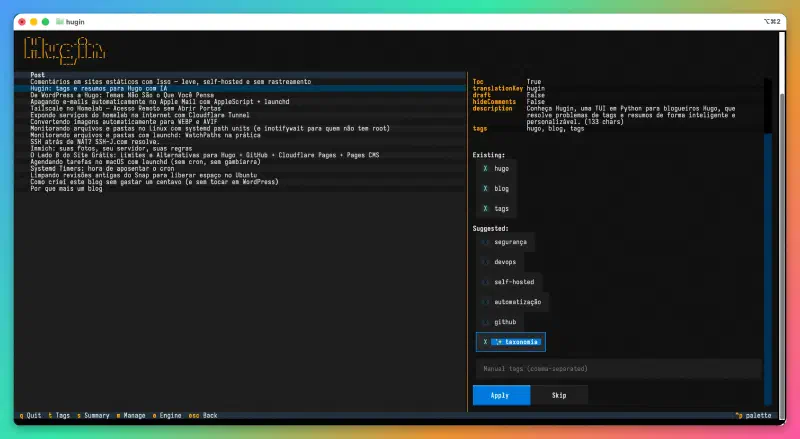
Hugin solves this in two ways. First, it collects all existing tags from the blog and sends them to the LLM sorted by usage frequency, with explicit instructions to prefer tags that already exist. Second, it passes each generated tag through a normalizer that applies lowercase, replaces spaces with hyphens, removes articles, and deduplicates against the existing pool. If the LLM suggests “The Docker” for a post, the normalizer turns it into “docker” — which is probably already in the pool.
New tags appear marked with a visual indicator in the interface. If the LLM suggested something that doesn’t exist in the blog, you know before applying it. And if you want to add tags manually — because sometimes the LLM simply doesn’t suggest the obvious — there’s a text field for that.
The summary problem#
Meta descriptions are those 150-character texts that appear in search results. Everyone knows they matter, nobody enjoys writing them. The typical result is an empty description (Hugo uses the first characters of the post) or a generic sentence that says nothing about the content.
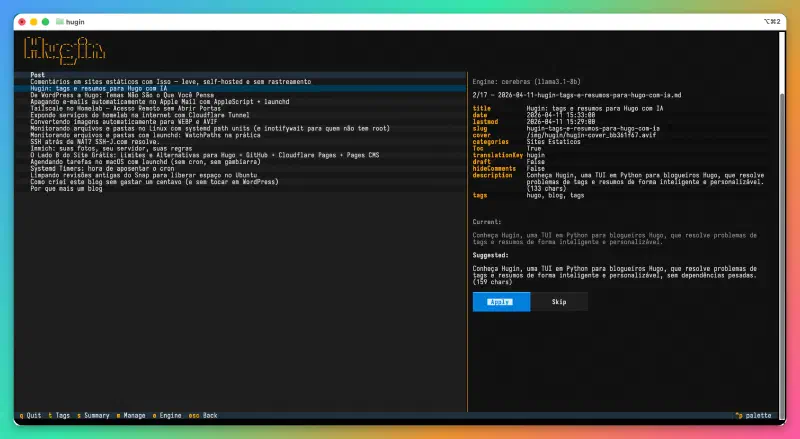
Hugin generates summaries between 140 and 160 characters, in the post’s language, with the persona of a blogger writing about their own work — not an SEO copywriter. In other words: no “Discover how…” or “Learn to…”. If the summary is too long, the LLM is automatically called again to shorten it. The result appears with a character count beside it, and is only saved if you approve.
Tag management#
As the blog grows, the taxonomy needs maintenance. Hugin has a dedicated screen for this: a list of all tags sorted by frequency, with rename, merge, and delete operations. Merge is particularly useful — select the source tag, choose the destination, and all posts are updated at once. If you have “linux” in 20 posts and “gnu-linux” in 3, it’s resolved in two clicks.
Model agnostic#
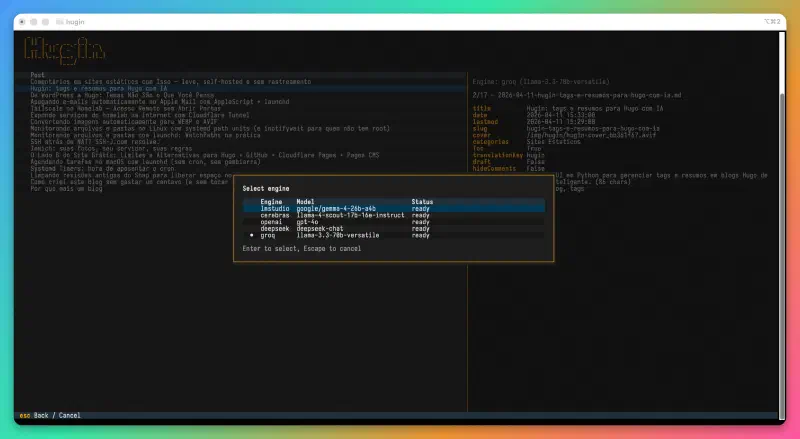
Hugin doesn’t depend on any specific AI provider. Any OpenAI-compatible API endpoint works: Cerebras, Groq, DeepSeek, OpenAI, LM Studio, Ollama. Engines are registered in a simple TOML file, and engine and model selection is done directly in the interface — including automatic listing of available models on the endpoint.
In practice, I’ve been using Cerebras for most posts (fast and cheap) and LM Studio with local Gemma for testing. Switching between them is one keystroke.
How it works in practice#
You open Hugin pointing to the posts directory:
hugin ~/blog/content/posts
The interface shows all posts in a navigable table. Select one, press t for tags or s for summary. A spinner appears while the LLM works. When the response arrives, suggestions appear with checkboxes — uncheck what you don’t want, check what you do, apply. The front matter is updated, the file is saved, and you move on to the next post.
No tokens are spent until you ask. No changes are made until you approve.
Stack#
For those interested in the technical side: Python 3.11+, Textual for the TUI, Click for the CLI, httpx for async LLM calls, python-frontmatter for reading and writing YAML. No database, no daemon, no heavy dependencies.
Code#
Hugin is open source and available on GitHub. If you maintain a Hugo blog and are tired of classifying posts manually, it might solve your problem too.
Repository: github.com/janiosarmento/hugin

Sysadmin, 53, Brazilian working from home for the world. Manages Linux servers, LXC containers, and cats that won't get off the keyboard.