Hugin on steroids: tags, links and editing in one TUI
In this post
In the post about Hugin I introduced the tool I use to generate tags and summaries for my Hugo blogs. Two weeks later, in the post about Munin, I showed its sibling: a second program that discovers and inserts internal links between posts using embeddings and an LLM.
Both worked well. Separately, they worked well.
The problem with having two programs#
In theory, splitting responsibilities between tools is good practice. In practice, the workflow for processing a new post looked like this: open Hugin, navigate to the post, generate tags, generate summary, close Hugin. Open Munin, wait for the embedding model to load, navigate to the same post, check existing links, generate link suggestions, apply. If you needed to fix a typo in the title that only showed up after reviewing the post in Hugin, close everything and open Pages CMS or vim.
With 5 new posts a week, this was a 20-minute ritual that could have been 5. The friction wasn’t in the features — it was in the context switching. Every time I left one program and entered the other, I lost the thread of what I was doing. And having to go to Pages just to fix a sentence or a title typo was the final insult.
The decision to unify#
There was no way around it: either I kept living with the friction or I merged everything. I chose to merge. Munin ceased to exist as a separate program, and all of its functionality was absorbed into Hugin. The result is a single command that does everything: tags, summaries, internal links, topic suggestions, and post editing.
What used to be two programs with nearly identical interfaces but distinct functions became a single screen with every action available by keypress. You navigate to a post and everything is right there: t for tags, s for summary, i for incoming links, o for outgoing links, l to list and remove links, u for new topic suggestions, e to edit the post. No closing, no reopening, no relocating.
What changed#
Built-in editor#
The most significant addition is the internal editor. Press e and a full-screen view opens with editable fields for each frontmatter field — title, date, description, slug, draft — and a TextArea with Markdown syntax highlighting for the post body. Tags are shown as read-only because there’s a dedicated t for that.
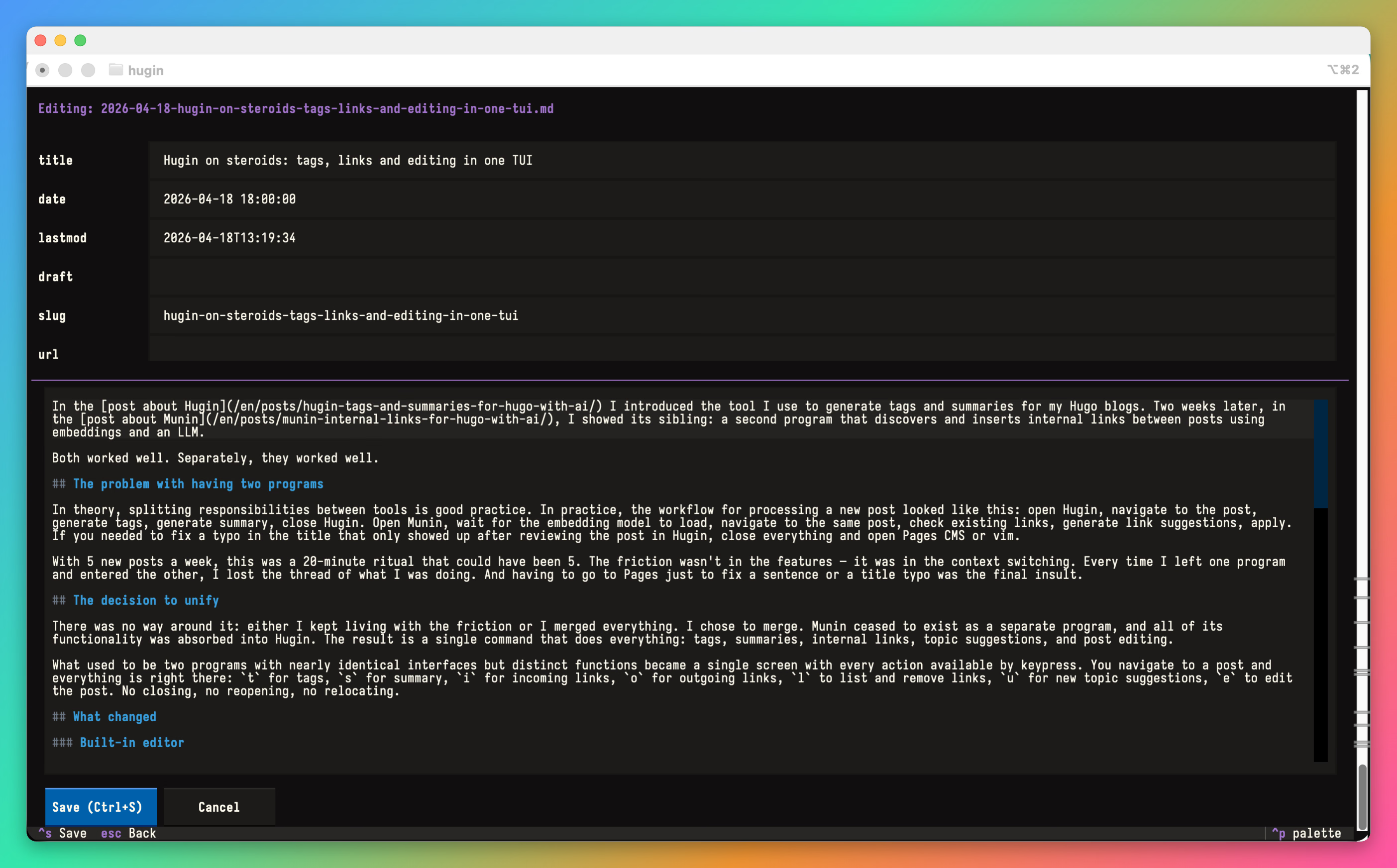
Saves are atomic: writes to a temp file and renames, exactly how Munin already handled links. If the process dies mid-write, the original file stays intact. And if you exit without saving, a confirmation dialog prevents accidental losses.
This eliminated the need to go to Pages CMS or open vim just to fix a paragraph. Quick corrections happen right there, without leaving the flow.
Loading indicator#
The subtle per-row spinners were replaced by a modal with a semi-transparent backdrop that appears during LLM operations. There’s no way to miss that the program is working. The message changes with the operation: “Generating tags…”, “Finding outgoing links…”, “Suggesting new topics…”.
Per-project settings#
Each blog now has its own configuration file with parameters that affect LLM behavior. Accessible via the p key:
- Summary words — the target word count sent in the prompt. My personal blog uses 28, the technical one uses 20.
- Summary style — a tone instruction sent directly to the LLM. Instead of choosing between presets like “formal” or “casual”, you write exactly what you want: “Write it engaging, causing on the reader the wish to read the full post.”
- Words per link — controls internal link density. A blog with 400 posts can afford to be liberal (150 words per link). One with 18 needs to be more conservative (400 or more).
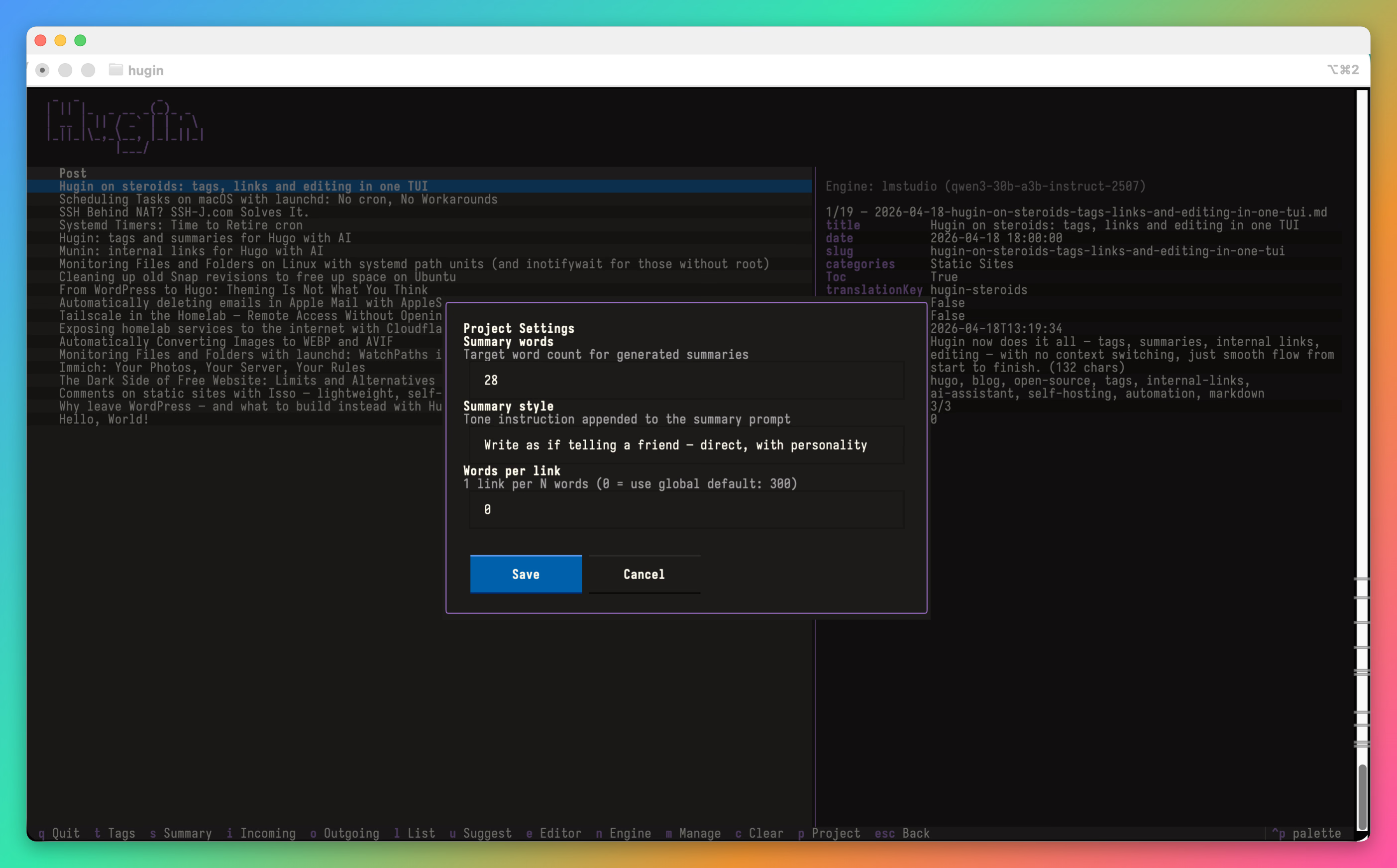
Project settings take priority over global defaults. If you don’t configure anything, the values from links.toml still apply.
Drafts excluded from embeddings#
Draft posts no longer show up as candidates for internal links. And if you change a published post to draft, it’s automatically removed from the embedding index on the next run. This prevents link suggestions pointing to posts that don’t exist on the published site.
More reliable cache#
Two issues that bit me in production were fixed. First: deleted posts lingered as ghosts in the embedding cache, generating link suggestions to pages that no longer existed. Now find_similar checks whether the file still exists on disk before returning a result.
Second: URLs became stale if the Hugo permalink configuration changed. Hugin now re-resolves URLs for all cache entries on every startup, without needing to clear and rebuild everything.
Persistence across sessions#
The Textual theme (the color palette you pick with Ctrl+P) now persists between runs. And the post that was selected when you quit is automatically restored next time. Small comforts that make a difference when you use the tool every day.
What stayed the same#
The core architecture didn’t change. Hugin is still a Python TUI that talks to any OpenAI-compatible endpoint. Engines, API keys, and model selection work exactly as before. The tag prompts and normalizer are the same. The embedding system is still local, no tokens spent. Link insertion still respects Markdown protected zones.
If you were using Hugin and Munin separately, the transition is simple: update the repo and reinstall. The munin command no longer exists — everything is hugin now. The munin.toml config file is still read as a fallback if links.toml doesn’t exist, so nothing breaks.
Current workflow#
My flow for processing a new post is now LOST:
- L (List) — check what links already exist in the post
- O (Outgoing) — ask for new link suggestions
- S (Summary) — generate the summary
- T (Tags) — generate tags
All in one program, no window switching, no reloading, no losing context. If I need to fix something in the text, e opens the editor right there.
Code#
Hugin is open source:
Repository: github.com/janiosarmento/hugin

Sysadmin, 53, Brazilian working from home for the world. Manages Linux servers, LXC containers, and cats that won't get off the keyboard.